Here is a bug I have seen in almost every JavaScript project I have worked on:
fetch('/api/data', {
  method: 'POST',
  body: JSON.stringify({ timestamp: Date.now() })
});
The frontend sends Date.now(). The backend stores it. Later, some other service reads that timestamp and passes it to new Date() — and the date is completely wrong. Not off by an hour, off by centuries.
The cause is simple: Date.now() returns milliseconds, but most backends expect seconds. That factor of 1000 is the difference between "July 2024" and "year 56522."
JavaScript Uses Milliseconds for Everything
JavaScript's Date API is built around milliseconds:
Date.now();              // 1720694400000 (13 digits)
new Date().getTime();    // 1720694400000
Everything defaults to milliseconds:
new Date(timestamp)expects millisecondsdate.getTime()returns millisecondsDate.now()returns milliseconds
This made sense when JavaScript was created. A 64-bit float can precisely represent milliseconds for about 285,000 years — more than enough. The problem is that almost everything outside JavaScript uses seconds.
Where the Confusion Happens
Sending to a Backend
const payload = { timestamp: Date.now() };
// Backend receives: 1720694400000
// Backend expects:  1720694400
If the backend stores that in a column expecting seconds, the value is 1000x too large. A Go backend reading it:
t := time.Unix(1720694400000, 0) // interprets as seconds!
fmt.Println(t.Year()) // 56522
A Python backend:
from datetime import datetime
dt = datetime.fromtimestamp(1720694400000)  # milliseconds treated as seconds
# Year 56522
Receiving from a Backend
If the backend sends seconds and you pass it directly to new Date():
const response = { created_at: 1719792000 }; // seconds
const date = new Date(response.created_at);
console.log(date.toISOString());
// "1970-01-20T21:43:12.000Z" — not 2024-07-01!
You forgot to multiply by 1000:
const date = new Date(response.created_at * 1000);
console.log(date.toISOString());
// "2024-07-01T00:00:00.000Z" — correct
The Only Rule You Need
Count the digits:
| Digits | Unit | Example | Date |
|---|---|---|---|
| 10 | Seconds | 1719792000 |
2024-07-01 |
| 13 | Milliseconds | 1719792000000 |
2024-07-01 |
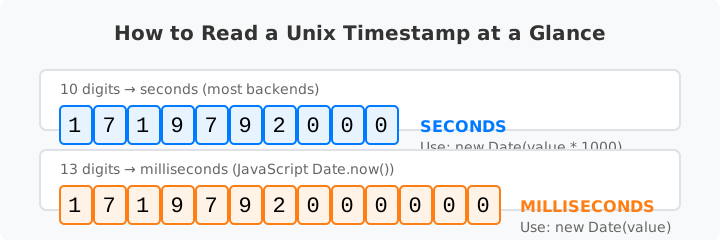
10 digits → seconds, multiply by 1000 for new Date(). 13 digits → milliseconds, pass directly.
A small utility makes this automatic:
function parseTimestamp(value) {
  const digits = String(Math.floor(value)).length;
  if (digits >= 12) {
    return new Date(value);        // milliseconds
  } else {
    return new Date(value * 1000); // seconds
  }
}
This heuristic works for any timestamp from 2001 to 2286, which covers nearly every real-world case.
Utility Functions I Use
I keep these in a time.js file on every project:
export function toUnixSeconds(date = new Date()) {
  return Math.floor(date.getTime() / 1000);
}

export function fromUnixSeconds(seconds) {
  return new Date(seconds * 1000);
}

export function toUnixMillis(date = new Date()) {
  return date.getTime();
}

export function fromUnixMillis(millis) {
  return new Date(millis);
}
Using named functions removes the ambiguity. You never have to remember whether to multiply or divide at the call site.
A Real Bug: The Chat App
A team I know built a chat app. The JavaScript client sent Date.now() to the server, which stored it in a MySQL INT column. The value 1720694400000 overflowed a signed 32-bit integer. Messages started showing as "Jan 19, 2038" — the classic overflow sentinel.
The fix was two lines: divide by 1000 on the frontend, and change the column to BIGINT. The same bug happens in Firebase, Supabase, and custom APIs regularly.
performance.now() Is Not a Timestamp
performance.now() returns high-resolution milliseconds since the page loaded. It is not based on the Unix epoch. Use it for measuring intervals, not for generating timestamps.
const start = performance.now();
// ... some code ...
const elapsed = performance.now() - start; // correct
Do not use it for created_at fields or for comparing with backend times.
ISO Strings vs Numbers
If your API returns ISO 8601 strings like "2024-07-01T00:00:00Z", new Date() handles them correctly:
new Date("2024-07-01T00:00:00Z"); // correct, parses UTC
But new Date("2024-07-01") without a timezone may be interpreted as UTC in some browsers and local time in others. Avoid bare date strings. Use full ISO timestamps or explicit numeric values.
Conclusion
The JavaScript seconds-vs-milliseconds confusion is the most common timestamp bug in web development. It is not hard to understand — it is just easy to forget.
new Date()expects milliseconds — multiply seconds by 1000- Backends almost always expect seconds — divide milliseconds by 1000
- Count the digits: 10 = seconds, 13 = milliseconds
- Use utility functions so you never write the conversion inline
- Document the unit in your API contracts and comments
For quick checks across both units, the FastUnix Timestamp Converter accepts either seconds or milliseconds and shows the date instantly.